Keyboard Shortcuts
MBXRemote supports both local and global keyboard shortcuts. Global hotkeys work system-wide, even when MBXRemote is minimized or in the background.
Playback Control
| Shortcut | Action | Scope |
|---|---|---|
| Space | Play/Pause toggle | Local |
| Ctrl+Space | Play/Pause toggle | Global |
| Ctrl+Right | Next track | Global |
| Ctrl+Left | Previous track | Global |
| Ctrl+S | Stop playback | Local |
Volume Control
| Shortcut | Action | Scope |
|---|---|---|
| Ctrl+Up | Volume up | Global |
| Ctrl+Down | Volume down | Global |
| Ctrl+M | Mute toggle | Global |
| Ctrl+0 | Set volume to 0% | Local |
| Ctrl+5 | Set volume to 50% | Local |
Tab Navigation
Navigate between tabs using Ctrl+Alt + key combinations:
| Shortcut | Tab | MusicBee Action |
|---|---|---|
| Ctrl+Alt+A | Tab 1 | Sends Ctrl+Alt+Q |
| Ctrl+Alt+S | Tab 2 | Sends Ctrl+Alt+W |
| Ctrl+Alt+D | Tab 3 | Sends Ctrl+Alt+E |
| Ctrl+Alt+F | Tab 4 | Sends Ctrl+Alt+R |
| Ctrl+Alt+G | Tab 5 | Sends Ctrl+Alt+T |
| Ctrl+Alt+H | Tab 6 | Sends Ctrl+Alt+Y |
| Ctrl+Alt+J | Tab 7 | Sends Ctrl+Alt+U |
| Ctrl+Alt+K | Tab 8 | Sends Ctrl+Alt+I |
| Ctrl+Alt+L | Tab 9 | Sends Ctrl+Alt+O |
| Ctrl+Alt+; | Tab 10 | Sends Ctrl+Alt+P |
Window Management
| Shortcut | Action | Scope |
|---|---|---|
| Ctrl+T | Minimize to system tray | Local |
| Ctrl+Shift+T | Toggle light/dark theme | Local |
| Ctrl+W | Close window (or minimize) | Local |
| F11 | Toggle mini player mode | Local |
| Escape | Minimize/exit based on settings | Local |
Library Navigation
| Shortcut | Action |
|---|---|
| Ctrl+F | Focus search box |
| Enter | Play selected track |
| Ctrl+Enter | Add to queue |
| Shift+Enter | Play next |
| Delete | Remove from queue |
| Backspace | Go back in navigation |
Media Keys
MBXRemote supports standard media keyboard keys:
| Key | Action |
|---|---|
| Play/Pause | Toggle playback |
| Stop | Stop playback |
| Next Track | Skip to next track |
| Previous Track | Go to previous track |
| Volume Up | Increase volume |
| Volume Down | Decrease volume |
| Mute | Toggle mute |
Customizing Hotkeys
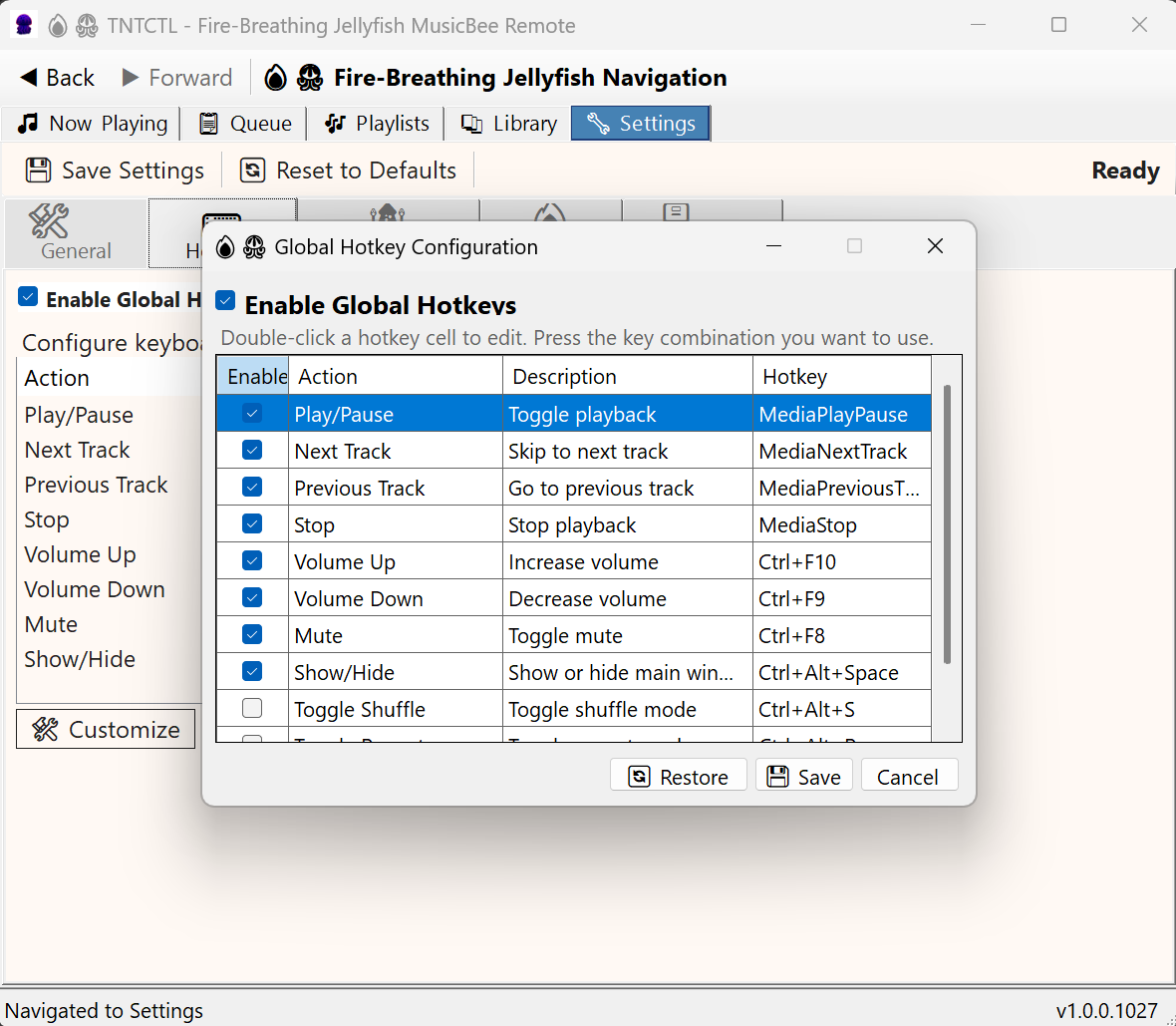
You can customize all hotkeys in the Settings:
- Go to Settings > Hotkeys
- Click on a hotkey row to select it
- Click "Record" or press the new key combination
- Toggle "Global" to make the hotkey work system-wide
- Click "Save" to apply changes
Hotkey Configuration
Initiator Actions
For more complex automation, use Initiator Actions to create custom macro scripts triggered by hotkeys.
Example: Quick Copy
Create a hotkey that selects all and copies:
sndKeys(CTRL A);delay(100);sndKeys(CTRL C)