Extended Plugin v1.5.10.26 with ARiA
Enhanced Functionality with ARiA
The extended MusicBee Remote plugin v1.5.10.26 with ARiA support unlocks the full potential of MBXRemote.
This plugin enables Initiator Actions, remote keyboard automation, tab navigation hotkeys, and other enhanced features for controlling your jukebox/media center.
Download Extended Plugin
v1.5.10.26
MusicBee Remote Plugin with ARiA (Arbitrary Remote Initiated Actions) support.
Download Plugin v1.5.10.26Compatible with MBXRemote 1.0.25.1221
What is ARiA?
ARiA (Arbitrary Remote Initiated Actions) is an extension to the MusicBee Remote Protocol that enables remote keyboard automation and enhanced control features.
Execute keyboard commands on the MusicBee host system. Send any key combination remotely.
Switch MusicBee UI tabs remotely using RIA1-10 hotkeys. Control the MusicBee interface from MBXRemote.
Send keys to MusicBee (!mb!) or the currently focused window (!nofocus!).
Execute multiple commands with delays using sndKeys();delay();sndKeys() syntax.
Installation Steps
Easy Install (Recommended)
- Download the plugin ZIP file using the button above
- Open MusicBee
- Go to Edit > Preferences > Plugins
- Click "Add Plugin"
- Select the downloaded
MBRC-Server-1.5.10.26.zip - Restart MusicBee
Enable ARiA
ARiA is disabled by default for security. To enable it:
- Go to Edit > Preferences > Plugins
- Find MusicBee Remote and click "Configure"
- Check "Enable ARiA (Arbitrary Remote Initiated Actions)"
- Click OK
How to Enable ARiA
ARiA is disabled by default for security. To enable Initiator Actions and remote keyboard automation:
- Go to Edit > Preferences > Plugins
- Find MusicBee Remote and click "Configure"
- Check "Enable ARiA (Arbitrary Remote Initiated Actions)"
- Click OK
When enabled, the plugin reports Protocol v4.5. When disabled, it uses Protocol v4.0.
Plugin Configuration (v1.5.10.26)
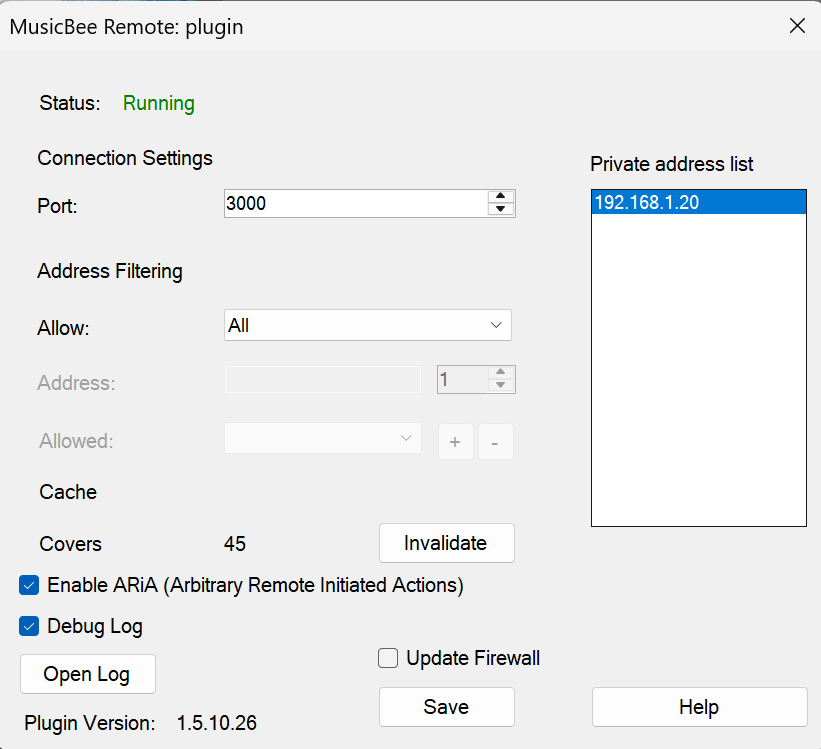
Verifying Installation
After installation, verify the plugin is working correctly:
- Open MusicBee and go to Edit > Preferences > Plugins
- Find MusicBee Remote in the list
- Verify the version shows 1.5.10.26
- Click Configure and verify ARiA checkbox is available
- Launch MBXRemote and connect to MusicBee
- Test an Initiator Action hotkey (e.g., Ctrl+Alt+Q for RIA1)
Security Considerations
🔒 Security Note
ARiA is disabled by default. You must explicitly enable it in the plugin settings. ARiA enables remote keyboard automation on your MusicBee host - only enable on trusted networks.
- Network Security: Only use on trusted local networks
- Firewall: Ensure your firewall is properly configured
- When disabled: All standard music control features work normally
Protocol Details
| Feature | Protocol Version | ARiA Required |
|---|---|---|
| Basic Playback Control | v4.0 | No |
| Volume & Mute | v4.0 | No |
| Now Playing Info | v4.0 | No |
| Library Browsing | v4.0 | No |
| Playlist Control | v4.0 | No |
| Initiator Actions | v4.5 | Yes |
| Remote Keyboard | v4.5 | Yes |
| Tab Navigation (RIA1-10) | v4.5 | Yes |
Troubleshooting
Plugin Not Loading
- Ensure MusicBee version is 3.0 or higher
- Check that .NET Framework 4.7.2+ is installed
- Verify plugin files are in the correct folder
- Check MusicBee's error log for messages
ARiA Features Not Working
- Verify ARiA is enabled in plugin settings
- Check that MusicBee window is not minimized
- Test with a simple action:
sndKeys(CTRL ALT Q) - Check plugin logs at:
%APPDATA%\MusicBee\mb_remote\
Version Mismatch
- Ensure you have version 1.5.10.26 or later
- Older versions may not support all ARiA features
- Re-download and reinstall if needed
Need Help?
For additional help with plugin installation and configuration:
- See the Plugin Overview for general plugin information
- See Initiator Actions for ARiA usage examples
- Contact mbxremote@halrad.com for support