
MusicBee TrueShuffle
Download MusicBee TrueShuffle
Latest Version
v1.0.26.3 STABLE
Released: January 2026
| Package | Contents | Download |
|---|---|---|
| Plugin DLL Ready to use |
mb_trueshuffle.dll | Download |
| Source Code Build it yourself |
plugin/, TrueShuffle.Tests/, build scripts | Source |
Installation
Step 1: Download
Download the ZIP file above and extract it.
Step 2: Copy Plugin
Copy mb_trueshuffle.dll to your MusicBee plugins folder:
- Default:
C:\Program Files (x86)\MusicBee\Plugins\ - Portable:
[MusicBee folder]\Plugins\
Step 3: Restart MusicBee
Close and reopen MusicBee to load the plugin.
Step 4: Enable Plugin
Go to Edit > Preferences > Plugins and enable TrueShuffle.
Step 5: Show Progress Panel
Go to View > Arrange Panels, find TrueShuffle in the list, and add it to your layout to see shuffle progress.
Configuration
Access settings via Tools > TrueShuffle Settings... or click Configure in Preferences > Plugins.
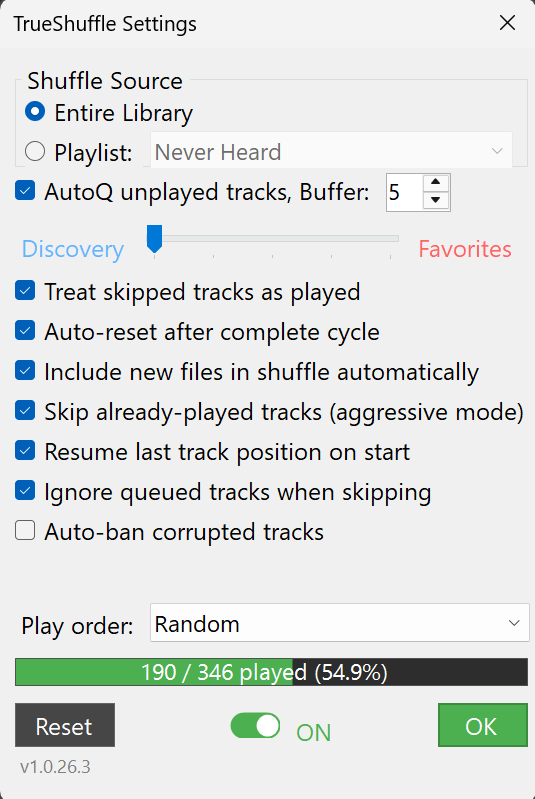
| Setting | Default | Description |
|---|---|---|
| Shuffle Source | Library | Entire Library or a specific Playlist (per-source state tracking) |
| Queue unplayed tracks | On | AutoDJ-like queueing - automatically adds next unplayed track |
| Play unheard (0 plays) first | On | Prioritize tracks with zero play count |
| Treat skipped as played | Off | Count skipped tracks toward progress |
| Auto-reset after cycle | Off | Automatically restart when all tracks played |
| Play order | Random | Random, By Album, By Track, Date Added (Oldest/Newest) |
Play threshold uses MusicBee's built-in settings from Edit > Preferences > Now Playing.
Using the Plugin
Progress Panel
A compact dockable panel shows:
- Current source (Library or Playlist name)
- Played / Total track count with percentage
- Enable/Disable toggle switch
Reset Progress
To start fresh, open Tools > TrueShuffle Settings... and click the Reset button.
System Requirements
| Component | Requirement |
|---|---|
| Operating System | Windows 7/8/10/11 |
| MusicBee | MusicBee 3.1 or later |
| Framework | .NET Framework 4.8 (included with Windows 10+) |
Data Location
Shuffle state is stored in:
%AppData%\MusicBee\mb_trueshuffle\state.jsonTo completely reset, delete this folder.
Troubleshooting
| Issue | Solution |
|---|---|
| Plugin not showing | Verify DLL is in correct Plugins folder. Check MusicBee error log. |
| Progress not saving | Check write permissions to %AppData%\MusicBee\ |
| Tracks not being marked | Ensure you're playing past your configured threshold |
| Wrong track count | Reset progress - the plugin will rescan your library |
| Panel shows blank | Toggle the panel off and back on in View > Arrange Panels |
Uninstall
- Delete
mb_trueshuffle.dllfrom MusicBee Plugins folder - Optionally, delete
%AppData%\MusicBee\mb_trueshuffle\to remove saved state