The Problem
You have a file named nul, NUL, in a folder, and Windows won't let you delete it. You get errors like "Could not find this item" or the file simply refuses to be removed.
This happens because NUL is a reserved device name in Windows, dating back to DOS. Other reserved names include CON, PRN, AUX, COM1-COM9, and LPT1-LPT9. Windows treats these as special system devices rather files. But why do we care about all of these crusty things in 2026?
nul. When that code runs in certain contexts, it creates a literal file named nul instead of discarding output. "Bugs" in Windows and in THE newest tools are causing the oldest Windows bug. "in theory" The 'nul' file should never exist, but yet it does, and the FACT IS many things (like the kernel and the file system) support a 'nul' file but Windows File Explorer does not.
The Issue: You are in the Shell or Windows File explorer looking at the files in a folder and see a 'nul' file. Easy peasy you may know you can type a 'unique' comand to express the 'path' to delete the file such as del "\\.\c:\temp\nul" and that works. BUT you have to 1) open the comand prompt and or 2) get the path to the file and 3) type the comand with the modified file path. Or write some other script to recursively remove them and maybye you do but most of you problably dont live in a command prompt.
Lets not get distracted with workarounds or trying to solve all of the reasons why it exists and forget THE ISSUE IS => You are in the file explorer looking at the file in file explorer - and Windows does EVERYTHING it CAN to get in the way of -HELPING YOU- the users in removing a file that really should not exist.
The Solution: ForceDelete
ForceDelete is a lightweight Windows shell extension that adds a "🙃 Force Delete" option to your right-click context menu. One click deletes any file — including NUL, CON, PRN, and other reserved names that Explorer refuses to touch.
Download ForceDelete
Native C++ shell extension — works reliably from File Explorer's context menu
Download ForceDelete-master.zipTwo Implementations
| Folder | Type | Notes |
|---|---|---|
CPP/ |
Native Shell Extension DLL | Recommended. Implements IShellExtInit + IContextMenu to receive file paths directly, bypassing Explorer's security validation. |
CSharp/ |
.NET Framework EXE | Command-line only. Does NOT work with context menu due to Windows Security blocking. |
IShellExtInit, which receives file paths as raw strings — no security validation on the target file.
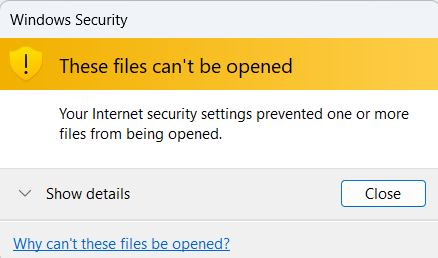
And no, the "Why can't these files be opened?" link doesn't help. It takes you to a generic Microsoft support page with zero context about the issue. At best, you're searching manually. At worst, it's another dead end in a chain of unhelpful dialogs.
Installation (Recommended: C++ Shell Extension)
Step 1: Build the DLL
Open x64 Native Tools Command Prompt for VS and run:
Step 2: Install
Right-click ForceDeleteExt.inf and select Install.
This copies the DLL to %ProgramFiles%\ForceDelete\, registers the shell extension, and adds an entry to Add/Remove Programs.
Step 3: Use it
Right-click any file → 🙃 Force Delete
Shows a confirmation prompt, then deletes. Error message only if something fails.
To uninstall:
Use Add/Remove Programs → "ForceDelete"
Why a Shell Extension Instead of an EXE?
You might have seen solutions using a simple EXE or batch file in the context menu. The problem: Windows Security performs validation on the target file when passing it as a %1 argument to a shell command — the same check that happens when you double-click a file. This triggers "These files can't be opened" errors.
A shell extension (DLL implementing IShellExtInit + IContextMenu) receives file paths via IDataObject as raw strings, bypassing this security check entirely. It's also:
- Native code, no runtime dependencies
- Handles files AND directories
- Clears read-only attributes automatically
- Works on UNC paths (network shares)
- Shows confirmation prompt before deletion
How It Works
ForceDelete uses the \\?\ NT path prefix to bypass Windows' reserved name validation:
The \\?\ prefix tells Windows to pass the path directly to the NT kernel without parsing. At the kernel level, "nul" is just another filename — the reserved name restriction only exists in the Win32 layer.
Alternative: Command Line Methods
If you prefer not to install anything, these commands work from CMD or PowerShell:
Method 1: Delete via Address Bar
- Open Windows Explorer and navigate to the folder containing the NUL file
- Click in the address bar at the top
- Type
cmdand press Enter — this opens Command Prompt in that folder - Type the following command and press Enter:
Replace nul with the actual filename if different (e.g., nul.txt).
Method 2: Using the \\.\ Prefix (Most Reliable)
The \\.\ prefix tells Windows to use the device namespace, bypassing the reserved name check.
Example:
Method 3: Delete All NUL Files in a Folder
If you have multiple NUL files or files with NUL in the name:
Method 4: Delete an Entire Folder Containing NUL Files
If the folder itself is giving trouble:
Method 5: Using PowerShell
Quick Reference
note: this is the NON-CODE-NON-SCRIPT manual open a window find the path and type it in solution. but keep in mind you are IN WINDOWS EXPLORER, you SPOT a NUL file that should NOT EXIST and have to go elsewhere to remove it. its 2026 im looking forward to 1996.Fix for File Explorer
Fixing this would not break compatibility
Explorer could:
\\.\)This would not break legacy apps, because Explorer is not a legacy app. It would simply make Explorer behave like the rest of Windows.
Conclusion
File Explorer's inability to delete NUL files is not a "quirk" or "by design." It is a clear mismatch between:
- What NTFS supports
- What the NT kernel supports
- What other Windows tools support
- And what Explorer should support
The result is a confusing, misleading, and unnecessary failure mode that forces users into obscure command-line workarounds for something as basic as deleting a file.
Fixing this would improve consistency, reduce user frustration, and bring Explorer in line with the capabilities of the modern Windows platform.
Until Microsoft fixes File Explorer and or OTHER PARTIES fix the things that are actually creating the file, and unless this utility is deemed to be TOO USEFUL and its also intentionally broken ForceDelete fills the gap.